sourceot.com

Proof of Delivery

Source is now using Route Track and Jump Track for tracking your deliveries!

The Online portal, Jump Track, will give you access to all delivery data with live updates and viewable signatures. With both Route Track and Jump Track, you will always know the status of your delivery.

PLEASE NOTE

Please note that this tool only shows proof of delivery data for local customers in the Colorado and Wyoming areas. If you aren’t able to find your order using this tool, please reach out to Customer Service.

Step 2

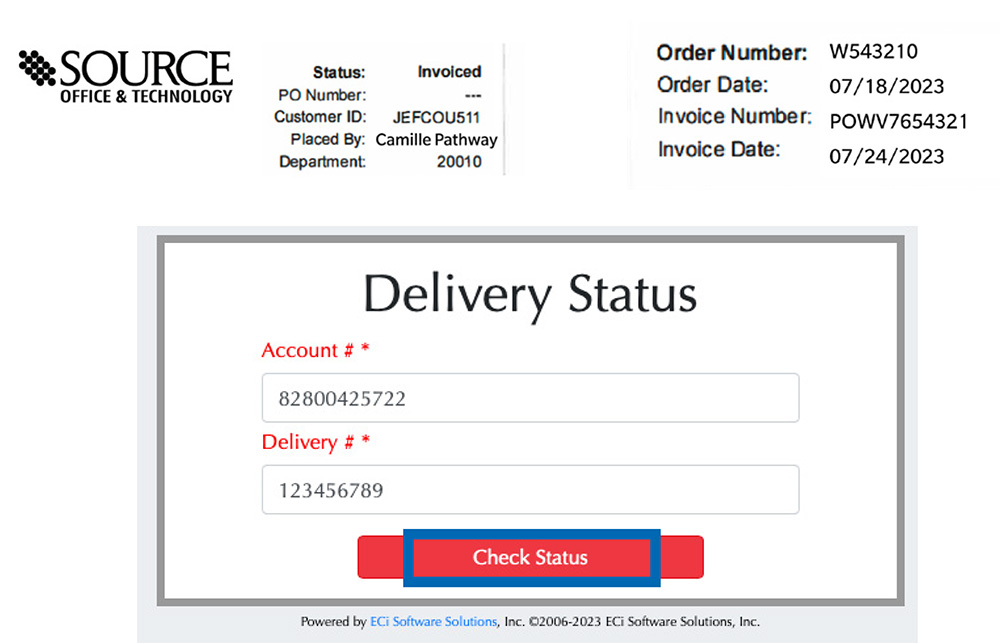
Enter the account number, including the department, on the line for “Account # *.”

For example, the customer number is 8280042 and the department is 5722; the account number would be 82800425722. Then enter your order number on the line for “Delivery # *.”

An example of where to find your order number is on your invoice, or feel free to contact your account representative for more assistance. Then click the red button, Check Status.

Step 3

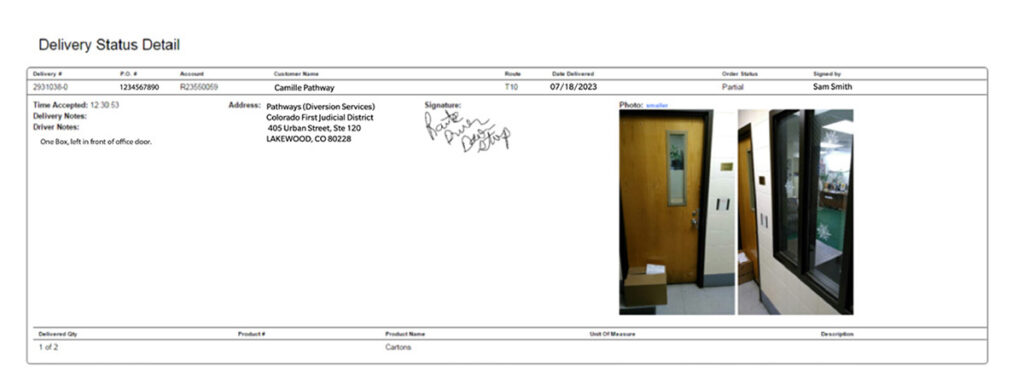
The Delivery Status Detail screen will populate after clicking the red button, Check Status.

From this screen, you will be able to see the full details, from when the delivery was accepted to images of the final delivery. These details include the date and time of the initial order, quantity delivered, acceptance signature, and photos of where the driver placed the package(s). From here you can click Print to print the screen or Done to return to the original screen and enter the next ticket number.

If you aren’t able to find your order using this tool,

please reach out to Customer Service.